Digital Orthodontic Planning: From Scanning to Clear Aligner Manufacturing
Explore digital orthodontic planning, including records, CAD preparation, setup, staging, clinician approval and clear aligner manufacturing checks.
Digital orthodontic planning evaluates initial and target tooth positions on digital models and divides movements into stages. CAD software used for clear aligner treatment supports the preparation and review of that design. This workflow is also referred to as clear aligner treatment planning.
A good digital plan consists of more than an aligned final model. Initial records, movement sequencing, intermediate contacts and manufacturing files must also be checked. The clinician additionally evaluates whether the plan is suitable for the patient’s clinical condition. Software output and clinical treatment decisions therefore carry different responsibilities.
Which records are needed before planning?
Digital models help assess visible tooth surfaces and occlusal relationships. However, surface scans alone do not provide all the clinical information required. The clinician considers examination findings, photographs and any necessary radiographic records together. Record requirements are determined individually.
From the laboratory’s perspective, the first check is that the files belong to the correct patient and jaw. Missing scan areas, the bite record and model scale are then reviewed. Identifying incomplete data early helps prevent planning from proceeding from an incorrect starting point.
| Checkpoint | Question | Required action |
|---|---|---|
| Case identity | Do the files belong to the correct case? | Match case details and file names |
| Upper and lower jaws | Have the two models been identified correctly? | Verify jaw labels |
| Occlusion | Do the models represent the initial relationship? | Compare with the records |
| Scan surface | Are any areas missing or disconnected? | Assess the source and request new records if needed |
| Treatment objective | Is the clinician’s intended result clear? | Clarify the planning instructions |
How are models prepared in CAD?
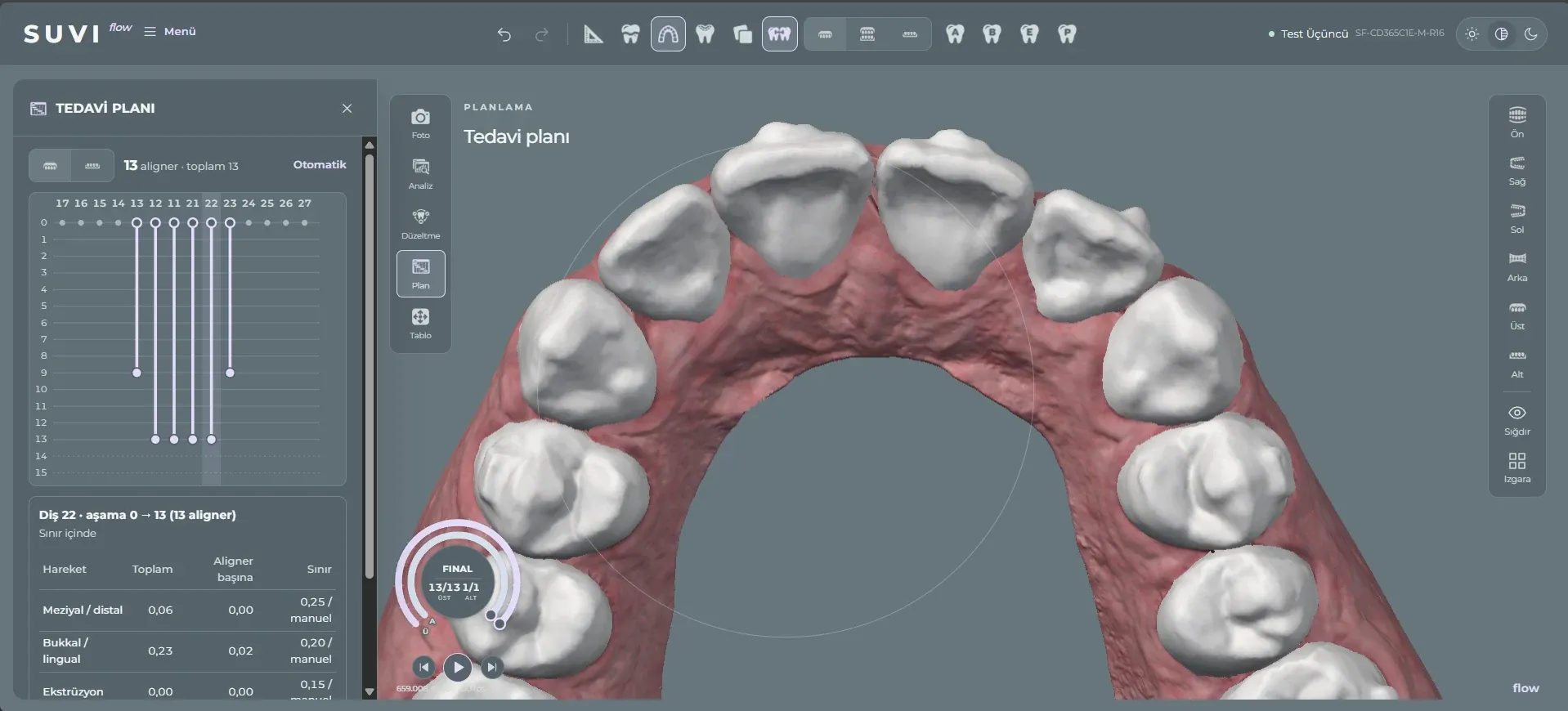
First, the models are aligned and the scan boundaries are reviewed. The teeth are then numbered. Segmentation converts each tooth into a separate object so that its position can be adjusted independently.
Preserving the scanned anatomy during surface cleanup is important. If smoothing changes tooth width or contact surfaces, the result needs reassessment. A smoother-looking model alone is not necessarily a more accurate model. Compare it with the initial scan before starting the design.
The Suvi Flow clear aligner CAD workflow provides model preparation and planning within one browser application. To learn what the software is used for, see the clear aligner design software guide.
Why are setup and staging evaluated separately?
The setup is the target tooth arrangement. Staging defines the order of movements and the intermediate stages from the initial position to the target. A final model alone does not explain how movements are sequenced. Two plans can therefore have the same final appearance but different intermediate stages.
For example, if space needs to be created for a tooth, the movement order of neighboring teeth becomes important. Each stage is reviewed in the software to assess contacts and space requirements. These checks must be interpreted in the context of the individual case. There is no universal stage count or single movement value suitable for every patient.
The staging and movement stages guide explains the distinction between initial and final positions. When communicating between the planning team and clinician, specifying which stages were reviewed is more informative than simply stating that the final result is acceptable.
How are attachments and IPR addressed?
An attachment is a composite feature used to support aligner retention and force transmission on a tooth. IPR is the controlled reduction of enamel at adjacent tooth contact surfaces. These are different procedures with different purposes.
The clinician determines their necessity and clinical details. The planning record should clearly identify the affected teeth and stages. This creates an understandable link between the clinical instructions and the digital plan. The attachments and IPR guide explains these terms in more detail.
What is reviewed during clinician approval?
The clinician evaluates treatment objectives and planned movements alongside the patient’s clinical findings. Intermediate stages, occlusion and auxiliary procedures are part of this review. After any required adjustments, the plan is checked again. In the SuviAligner service, manufacturing does not begin without clinician approval.
Digital simulation shows planned movements. It does not guarantee the actual biological response or patient compliance. This distinction should also be maintained when explaining a preview to a patient. The clear aligner treatment guide introduces the question of suitability.
Which checks are needed before manufacturing?
The correct version of the approved plan is selected. Stage numbers, upper/lower jaw matching and exported files are verified. The manufacturing team then applies its own quality checks for the printing and aligner production method used. Opening a file and confirming its suitability for manufacturing are separate checks.
Clinics can submit cases through Suvi Hub. Teams that want to create their own designs can explore Suvi Flow. The SuviAligner service workflow explains the option of delegating planning and manufacturing.
Frequently asked questions
What is digital orthodontic planning?
It evaluates current and target tooth positions on digital models and prepares the movement sequence and stages. CAD software supports this design process.
Is CAD alone sufficient for clear aligner treatment?
No. CAD supports digital design. Examination, diagnosis, periodontal assessment, suitability decisions and clinical follow-up are performed by the clinician.
What is the difference between a final model and staging?
The final model shows the target arrangement. Staging shows the planned sequence and intermediate stages from the initial arrangement to that target.
How is a case submitted for planning and manufacturing?
Case records are submitted through Suvi Hub. The team prepares the plan, which proceeds to manufacturing after clinician review and approval.
- #digital-orthodontic-planning
- #orthodontic-cad
- #clear-aligner-treatment
- #clear-aligner
- #Suvi-Flow